DAW manual · Bitwig · Views
12 Browser
Find a device or preset by ear without leaving the keyboard. Holding SEQ opens Bitwig's browser, the keyboard's screen lists the results, and you scroll and hear them while you play.
Download the Bitwig PDF PDF, 0.5 MB
Getting there
Hold SEQ for half a second in any view. Bitwig opens its pop-up browser to replace the selected device, or to add a device when the track has none. Hold Oct- and hold SEQ to insert a new device after the selected one instead. The keyboard shows the Browser view.
What the screen shows
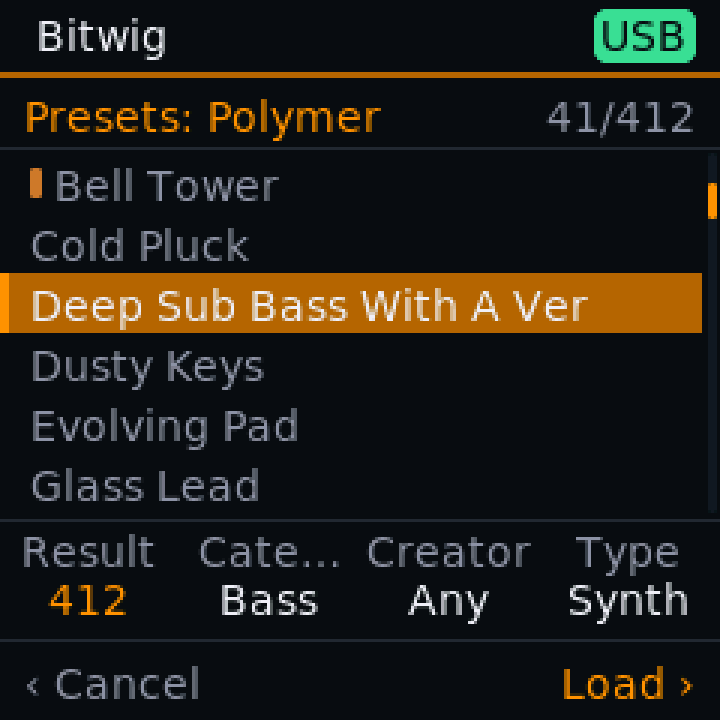
- The browser's title (what is being browsed; No results when a filter leaves nothing) and the cursor's position in the results ("41/412").
- Eight result rows; the cursor's row is filled with the accent colour. Long names are cut.
- The knob labels along the bottom: Result, Category, Creator, Type, and < Cancel / OK > over Left / Right.
The controls
| Control | In the Browser |
|---|---|
| K1 | Scroll the results. Bitwig previews the result under the cursor; play the keys to hear it |
| K2 | Category filter |
| K3 | Creator filter |
| K4 | File type filter |
| Right | OK: load the result and close |
| Left | Cancel: close without loading |
| SEQ (tap) | Cancel, as Left |
After closing, the keyboard returns to the view you came from. Closing the browser in Bitwig (Esc, a click outside) does the same.
Finding a sound
- Select the track and the device to replace (Device view: Oct- + Left / Right).
- Hold SEQ. Turn K2 to the category you want ("Bass"), K3 to narrow by creator if you like.
- Turn K1 slowly and play a few notes on each result.
- Right keeps it, Left keeps the old device.
Good to know
- SEQ alone replaces the selected device; Oct- + SEQ held adds a new one after it, so you can build a chain (synth, then EQ, then delay) from the keyboard.
- The rows follow the cursor a page of eight at a time.