DAW manual · Live · Views
12 Overview
The view for arranging and recording: a big tempo and play position, the state of loop, metronome, overdub and automation, and knobs for the song's tempo, groove, loop and the return tracks.
Download the Live PDF PDF, 0.5 MB
Getting there
Tap SEQ until the status bar reads Overview. The middle of the status bar names Live's main view: Session or Arrangement.
What the screen shows
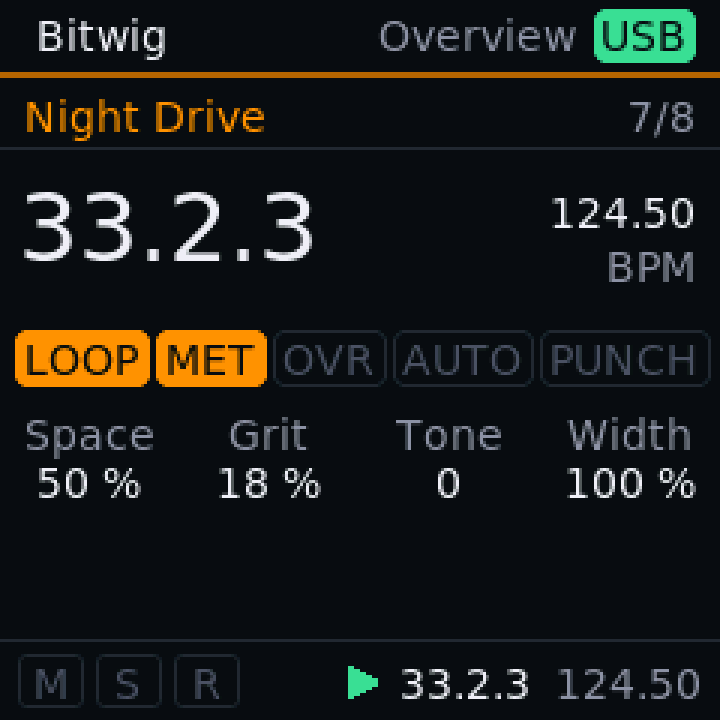
- Tempo in large digits and the position as bar.beat.sixteenth, with the time signature and PLAY, REC or STOP.
- Chips, lit while on: LOOP, MET, OVR, AUTO, PUNCH.
- Knob cells for the knobs.
Live gives scripts no project name, so none is shown.
The controls
| Control | In the Overview |
|---|---|
| K1 | Tempo: 1 BPM per click (0.1 with Oct- or the Shift pad) |
| K2 | Swing amount |
| K3 | Global groove amount |
| K4 | Loop start, one bar per click (a beat with the modifier) |
| K5 | Loop length, one bar per click (a beat with the modifier) |
| K6 | Play position, one bar per click (a beat with the modifier) |
| K7 | Master volume |
| K8 | Cue (preview) volume |
| K9-K16 (Knob Bank B) | Volumes of the return tracks A-H |
| Left / Right | Play position one bar back / forward |
| Oct- + Left / Right | Four bars back / forward |
Oct- + K8 is the tempo here too, as in every view.
Good to know
- Pads, faders and transport work as everywhere.
- Oct- + pad 16 of bank B switches between Session and Arrangement; the status bar follows.